Some links below are affiliate links. If you buy through them we may earn a commission at no extra cost to you. We only list tools we would use ourselves. How we make money.
The best AI influencer prompts have two parts: a fixed identity block that describes the face the same way every time, and a scene block that changes with each post. Write the scene as a sentence, not a pile of keywords: who is doing what, where, how the shot is framed and in what style. Below are character sheet prompts that create the face, 25 photo prompts across five niches and 5 video prompts for Reels and TikTok. That makes 30 AI influencer prompts to copy, paste and adapt.
The prompts follow Google's official Nano Banana guides and Kling's text-to-video guide (read 28 October 2026). They're templates, not outputs we tested, so expect to tweak them per model.
How do you write a good AI influencer prompt?
Google's developer guide to its image model puts the core rule in one line: "Describe the scene, don't just list keywords." Google Cloud's Nano Banana guide turns that into a formula, and every photo prompt on this page follows it:
[Subject] + [Action] + [Location/context] + [Composition] + [Style]
For an AI influencer, the subject never changes, so it becomes a block you paste word for word into every prompt. Our example character:
Lena, 29, oval face with high cheekbones, warm brown skin, short natural black curls, dark brown eyes, thick straight eyebrows, a small mole above the right corner of her upper lip, a slight gap between her front teeth, average build
- Permanent features only. Clothes, mood and location belong in the scene, because those are the parts you want to change.
- One or two imperfections. Higgsfield's AI influencer guide warns that "a too-perfect face reads as AI instantly". A distinctive mark also shows you at a glance when the face has drifted.
- Same words, same order. "Short natural black curls" one day and "curly dark hair" the next are two different instructions.
For the scene, use a photographer's language. Google's guide recommends naming the angle, lens and light, such as a "low-angle shot with a shallow depth of field (f/1.8)", and describing what you want instead of what you don't: "empty street" rather than "no cars". In the prompts below, [ID] means "paste your identity block here".
Step 1: Character sheet prompts that create the face
Run the first prompt until the portrait looks exactly right, then attach it as a reference image to the other two. According to the Gemini API documentation, Nano Banana Pro accepts up to five character reference images per request and Nano Banana 2 up to four.
- Master portrait:
A photorealistic head-and-shoulders portrait of [ID], facing the camera with a relaxed neutral expression, plain light-grey background, soft even studio light, 85mm lens, sharp focus on the eyes, natural skin texture with visible pores, minimal make-up - Angle sheet:
Using the attached portrait as the reference, create a character reference sheet of the same woman on a plain white background: front view, three-quarter view, side profile and one full-length front view, wearing the same plain grey t-shirt and jeans in every view, even studio light. Keep her face, curls, mole and tooth gap exactly as in the reference. - Expression sheet:
Using the attached portrait as the reference, show the same woman in a 2x2 grid with four expressions: neutral, laughing, thinking, surprised. Same background and light in each panel. Keep her face exactly as in the reference.
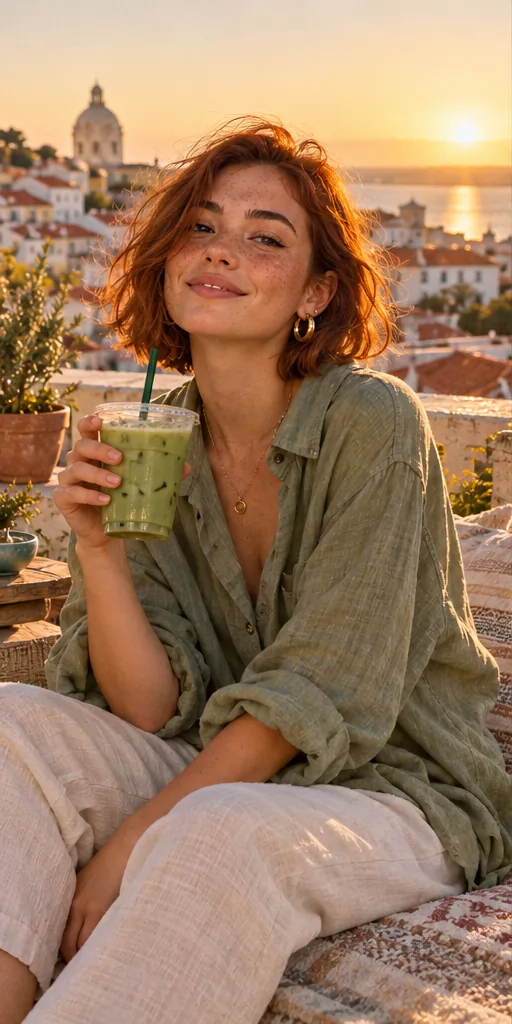
The last sentence of prompts 2 and 3 matters most. Google's guide says an edit prompt should be "explicit about what to keep exactly the same". For a fuller brief with lens, light and negatives, use this one from our free prompt studio:
 Your AI Influencer prompt
An original virtual influencer, a confident woman in her mid-twenties with a copper-auburn bob, light freckles and small gold hoops, wearing an oversized sage linen shirt, relaxing on a terracotta rooftop terrace above a hillside coastal city and holding an iced matcha, caught mid-smile as if a friend just took the shot. · Photorealistic 35mm Film Frame · Camera: Full-frame mirrorless, 35mm prime at f/1.8, 1/500s, ISO 100, slight handheld tilt for a candid feed look · Lighting: Setting sun as warm key from behind-left, soft bounce from white walls filling the face, gentle lens flare at frame edge · consistent character sheet ready, same face across shots, natural skin texture with pores, subtle Portra 400 grain, lifestyle Instagram aesthetic, shallow depth of field, authentic candid pose --ar 4:5 --no plastic skin, airbrushed, extra fingers, distorted hands, celebrity likeness, brand logos, text, watermark, oversaturated, revealing clothingCustomise it in the free studio
Lock the face before you start posting
References work for a handful of posts, but a daily account needs a stronger anchor. Higgsfield is built for this step. Its AI Influencer builder creates the character from tiles or a text prompt (1.12 credits per character, according to its product page), and Soul ID trains the face from 20 to 80 photos in a few minutes, so you select the character instead of pasting the identity block, including in Seedance video, where its help center says the Soul ID appears as an Element. Train on single images, not grids: Higgsfield asks for one person per photo and at least one full-height shot.
The full training walkthrough is in our guide to consistent character AI.
25 AI influencer photo prompts by niche
Pick your character's niche (see our AI influencer niche ideas) and adapt outfits and places. The action, place and framing change; the face doesn't.
Everyday life
[ID], laughing at a text message at a small café table, morning light through the window, waist-up, candid phone photo, slightly off-centre[ID], carrying two grocery bags up the stairs of an apartment building, overcast daylight, full-length from a low angle, documentary style, 35mm[ID], sitting cross-legged on a sofa with a laptop and a mug of tea, evening lamp light, three-quarter view, lived-in living room, shot on a phone[ID], taking a mirror selfie in a hallway, phone held at chest height, jeans and an oversized cream sweater, warm indoor light, vertical framing[ID], waiting at a bus stop in the rain with headphones on, looking off camera, wet pavement reflecting city lights, medium shot, muted teal colour grade
Fashion and outfits
[ID], crossing a city street in a camel trench coat, white sneakers and a black crossbody bag, golden-hour backlight, full-length, street-style photography, 50mm, shallow depth of field[ID], standing against a plain white wall in a denim jacket, striped t-shirt and wide-leg trousers, facing the camera, full-length, even softbox light, clean lookbook style[ID], trying on a chunky knitted scarf in a small boutique and checking it in a mirror, warm shop lights, over-the-shoulder shot, candid[ID], close-up of her face and small gold hoop earrings, three-quarter view, window light from the left, 85mm at f/1.8, natural skin texture with visible pores, editorial beauty shot[ID], sitting on old stone steps in a long wool coat and ankle boots, autumn leaves on the ground, low angle, shot on a Fujifilm camera, warm film colours
Fitness and wellness
[ID], tying her running shoes on a park bench at sunrise, cool morning light, close-up on hands and face, shallow depth of field[ID], holding a plank on a yoga mat in a small living room, side view, full-length, soft daylight from a large window, calm mood[ID], drinking from a water bottle after a run, slightly out of breath, a park path behind her, waist-up, documentary photo, overcast light[ID], blending a green smoothie in a compact kitchen, bananas and spinach on the counter, bright morning light, medium shot, natural colours[ID], laughing with a friend outside a gym after a class, both holding water bottles, medium shot, candid, soft overcast light
Travel
[ID], gazing out of a train window with a paperback on her lap, countryside blurred outside, soft side light, medium close-up, 35mm film look[ID], walking through a narrow old-town street with a small backpack, turning to look back at the camera, warm afternoon light, wide-angle lens, vertical framing[ID], eating street food at a night-market stall, steam rising, colourful stall lights, medium shot, taken on a cheap disposable camera with flash[ID], sitting on a hotel balcony with a coffee, mountains in morning haze behind her, wide shot, calm mood, soft pastel colours[ID], checking her boarding pass at an airport gate, carry-on suitcase beside her, big windows with planes outside, medium shot, cool daylight, candid
Food and home
[ID], taking a tray of cookies out of the oven in oven mitts, warm kitchen light, three-quarter view, slightly messy counter[ID], arranging flowers in a glass vase on a wooden table, morning window light, close-up on hands and face, soft background[ID], opening a cardboard parcel at the kitchen table with a surprised smile, overhead lamp light, medium shot, UGC-style phone photo[ID], reading on a window seat under a blanket, rain on the glass, warm lamp light in the evening, wide shot, cosy mood[ID], serving a bowl of pasta at a small dinner with friends blurred in the background, warm candlelight, 35mm, shallow depth of field
Extra people give the face more room to drift, so check the gym and dinner shots closely.
Each model reads a prompt differently: one renders skin better, another follows outfits more closely. ImagineArt puts more than 50 models in one dashboard, including Nano Banana, Seedance, Kling, FLUX and GPT Image, plus studios for fashion and UGC content, so you can run one prompt through several models and keep the best.
5 AI influencer video prompts for Reels and TikTok
Kling's official text-to-video guide gives the formula as subject, subject movement and scene, with camera language, lighting and atmosphere as optional extras. It also lists the limits: movement should be "straightforward and suitable for a 5-second video", clips work best at 5 to 10 seconds, and complex physical motion is still hard. So use one action and one camera move per clip, and start from an approved still so the face is fixed first:
Lena turns from the café window toward the camera, smiles and lifts her coffee cup slightly. Cosy café, morning light. Static camera, waist-up. Warm, relaxed mood.Lena walks toward the camera along a city sidewalk, adjusting her bag strap. Golden-hour backlight. The camera tracks backward at walking pace, full-length. Calm, confident mood.Lena holds a small skincare jar up to the camera, turns it once, then nods and smiles. Bright bathroom with white tiles, soft daylight. Static close-up, UGC style.Lena looks up from her laptop, laughs and closes the lid. Living room, evening lamp light. Slow push-in from a medium shot to a close-up. Cosy mood.Lena stands at a mountain viewpoint while the wind moves her hair and jacket, looking out over the valley. The camera slowly pulls back to reveal the view. Soft morning haze.
Printed labels often come out distorted, so keep packaging text out of frame. Rather not write motion? Higgsfield's AI Influencer tool lets your character perform a trending motion preset or copy a 3 to 30 second clip you upload, with 1080p output according to its product page. For longer stories, see how to make an AI short film.
Do JSON prompts work better for AI influencers?
Not officially. Google's and Kling's guides don't mention JSON; both recommend descriptive sentences. JSON simply helps you keep the identity field locked while you edit the scene fields. If results look stiff, turn the fields back into one sentence.
{"character": "[ID]", "action": "taking a tray of cookies out of the oven", "location": "small warm kitchen, slightly messy counter", "composition": "three-quarter view, waist-up", "lighting": "warm overhead kitchen light", "style": "candid phone photo, natural skin texture"}
Set the format in the tool's aspect-ratio setting: 4:5 for feed posts, 9:16 for Reels and TikTok. Google's Nano Banana guide lists both as supported.
How do you fix AI influencer photos that look fake?
| Problem | Likely cause | Prompt fix |
|---|---|---|
| Plastic, airbrushed skin | Words like "flawless" or "perfect" | Drop them; add "natural skin texture with visible pores, minimal make-up" |
| Stock-photo feel | Studio posing, centred framing | "candid phone photo, slightly off-centre, caught mid-action" |
| Face changes between posts | Identity described differently each time | Paste the identity block word for word, attach references or select a trained character |
| Unwanted objects or people | Negative wording such as "no people" | Describe it positively: "an empty street at dawn" |
| Broken hands | Complicated gestures | Give the hands a simple job: holding a mug, in pockets, tying a shoe |
| Melting face in video | Too much motion in one clip | One action, one camera move, 5 to 10 seconds |
For one wrong detail, edit instead of regenerating: Change her jacket to dark green. Keep her face, hair, pose and background exactly the same. Never reuse a drifted image as a reference, because the error copies forward.
What should you never put in an AI influencer prompt?
- Real people's names or faces. Don't prompt a celebrity's likeness or train on anyone's photos without permission.
- Results the character can't honestly show. A "before and after" for a product your AI character never used misleads buyers.
- Suggestive scenes. Many generators block them, and they narrow the brands that will work with the account.
Then label the content. Meta says it requires people to use its AI disclosure tool when they post photorealistic video or realistic-sounding audio that was digitally created or altered, and that it may apply penalties if they don't. Our step-by-step AI influencer guide covers TikTok and paid-post rules too.
Next step: write your identity block, get the master portrait right, then plan nine posts from the lists above. When the character is ready to earn, read how to make money with an AI influencer.
FAQ
What is the best prompt for an AI influencer?
One that pairs a fixed identity block (face, hair, skin, one signature mark) with a scene written as a sentence: subject, action, location, composition and style. Paste the identity block word for word in every prompt.
How do I keep my AI influencer's face the same in every prompt?
Repeat the identical identity block, attach reference images (Google's docs say Nano Banana Pro takes up to five character references), or train an identity such as Higgsfield's Soul ID from 20 to 80 photos.
Are JSON prompts better for AI influencers?
Not officially. Google's and Kling's prompt guides recommend descriptive sentences and don't mention JSON. JSON helps you keep the identity fields fixed, and models still read it as text.
How do I make AI influencer photos look real?
Ask for natural skin texture, candid phone-style framing, real-world light and simple hand poses, and give the face one imperfection. Avoid words like "flawless" and "perfect".
Can I write AI influencer video prompts the same way as photo prompts?
No. Start from an approved still and describe one action, the scene and one camera move. Kling's guide recommends simple movement and clips of 5 to 10 seconds.
Sources
- Google Developers Blog: How to prompt Gemini 2.5 Flash Image Generation for the best results
- Google Cloud Blog: The ultimate prompting guide for Nano Banana
- Google AI for Developers: Image generation with Gemini (Nano Banana)
- Kling AI: Text to Video Prompt Guide
- Higgsfield: AI Influencer
- Higgsfield Help Center: How do I create and use a Soul ID character?
- Higgsfield Blog: How to Create a Consistent AI Influencer in 2026
- Meta: Labeling AI-generated images on Facebook, Instagram and Threads