
Some links below are affiliate links. If you buy through them we may earn a commission at no extra cost to you. We only list tools we would use ourselves. How we make money.
Yes, you can still use AI product photos on Etsy, but not for every image. Since Etsy's 22 October 2026 policy update, most listings must include at least one unedited photo of the actual item against a real background. Your other photos can use AI to change the background, fix the light, crop or resize, as long as they show exactly what the buyer will receive. What you can't do is let AI make the only picture of your product, hide flaws or change how the item looks.
So the winning setup is one honest phone photo plus several clean AI-assisted images. This guide covers what the new rule says word for word, the exceptions for print-on-demand and digital sellers, how to shoot the unedited photo, and a workflow for the AI images that buyers (and Etsy's checks) won't flag. It is based on Etsy's own Help Center pages, read on 2 November 2026, and news coverage of the announcement. It is research, not a test of Etsy's detection system.
What did Etsy change about AI product photos?
Etsy announced the change on 22 October 2026 in a post called "Creativity and Trust in the Age of AI". As quoted by PPC Land, the post says sellers "will need to include at least one unaltered photo of the actual item against a real background" and that "any supplemental AI-assisted listing images must accurately represent the item a buyer will receive." Etsy's VP of customer operations, James Ossman, summed it up as "AI should support your creativity and craftsmanship, not replace them" (quoted by Digital Commerce 360).
Etsy's Help Center now spells out the rules. Here is what they allow and forbid:
| What you want to do | Allowed? | Etsy's wording (Help Center) |
|---|---|---|
| Use only AI-edited photos | No (for most items) | "Your listing must include at least one unedited photo of the actual item against a real background" |
| Edit the required photo (any edit) | No | It "must not be edited or changed in any way" |
| Swap backgrounds, fix lighting or color, crop or resize your other photos with AI | Yes | Allowed "as long as those edits don't make the item appear different" |
| Remove scratches, stains or damage | No | "Don't use AI to hide damage or change an item's appearance in a way that could mislead buyers" |
| Show a different color, size or material than you ship | No | Images "must accurately reflect the item's true appearance, including color, condition, scale, and materials" |
| Sell AI-generated art | Yes, with disclosure | Allowed "when sellers play a clear creative role" and disclose AI use |
Two practical notes. First, "in any way" is strict: Value Added Resource reads it as ruling out even cropping, straightening and exposure tweaks on that one photo, so frame it right in the camera. Second, enforcement is still ramping up. Etsy says it will show tips when it detects AI-generated images during listing, that buyer reports of AI misuse "won't result in immediate enforcement action" at first, and, per Digital Commerce 360, that removals will expand in the coming months. Removed listings can be appealed from the Policy violations page in Shop Manager.
Are there exceptions for print-on-demand, digital and custom items?
Yes. Etsy's Help Center lists four cases where the requirement works differently:
- Print-on-demand: if a production partner prints your original design on a standard product (a t-shirt, a mug), you can use a stock mockup, as long as the mockup's owner has authorized its use.
- Digital downloads: printables and templates need a preview of the actual content. Digital items with no visual component can use representative imagery, "including AI-generated images", if it doesn't mislead buyers.
- Customized or made-to-order items you make yourself: use photos of real, finished pieces you've made before, so buyers can judge your quality.
- Patterns, recipes, seeds and similar: include at least one real, unedited photo of something made with your product. AI images can't be the only proof of the result, and AI-written patterns and recipes are now banned outright.
If you sell physical items you make, source or curate, assume the standard rule applies: one real, unedited photo per listing.
How do you shoot the unedited photo so it still sells?
Because you can't fix this photo afterwards, all the work happens before you press the shutter. A phone is enough. These steps follow Etsy's size and thumbnail advice:
- Pick a real, plain background. A wooden table, a linen cloth, a white wall or a sheet of paper all count as "real". Clear away clutter so the item is obviously the subject.
- Use soft daylight. Put the item near a window, out of direct sun, with a piece of white card opposite the window to fill shadows. Good light is the only "edit" you get.
- Turn off the effects. Switch off portrait mode, beauty filters and in-camera filters. Etsy hasn't said how it treats automatic phone processing, so keep the photo as plain as your camera allows.
- Shoot horizontal with room around the item. Etsy recommends horizontal (landscape) photos and says to capture the item "further back than you think you'll need", because thumbnails get cropped to square, portrait and landscape views. Center the most important part.
- Check the size. Etsy recommends at least 2,000 pixels in width and height; a first photo under 635 pixels can show up lower in search. Modern phone cameras exceed both.
- Upload the original file. Etsy notes files over 1MB may not finish uploading on slow connections, so use a good connection rather than compressing the file.
Etsy also asks you to make your first photo "the clearest, most realistic representation" of the item. If your unedited photo is clean and well lit, it can do that job. If your AI-assisted hero image is the first one, make sure it matches the real item exactly.
How do you make AI product photos for Etsy that stay honest?
Here is the problem most sellers hit: the phone photo is fine for trust, but a row of clean, consistent listing images is what makes a shop look professional in search results. The safest way to get them with AI is to keep your real product pixels and change only what's around them. Tools that cut out the real item and generate a new backdrop can't accidentally redraw your glaze, stitching or engraving. A general image generator asked to "recreate" your product can.
A 5-step workflow for the supplemental images
- Shoot 3 to 5 extra photos in the same session: front, back or side, a detail close-up and one shot with a familiar object for scale.
- Remove the background from each with a cut-out tool. Check edges at 100% zoom, especially on hair-thin chains, fringe and glass.
- Generate a scene around the real cut-out: a kitchen counter for a mug, a gift box for a necklace, a reading nook for a candle. Add a contact shadow so the item sits on the surface instead of floating.
- Resize for Etsy: horizontal, at least 2,000 pixels per side, sRGB, saved as JPG (Etsy shows transparent areas in PNGs as black).
- Compare every image with the real item under daylight: color, size, finish and any flaws. If a buyer would be surprised when the parcel opens, the image fails.
Photoroom is built for exactly this. Its Etsy page describes the same chain (Background Remover, AI Backgrounds, AI Shadows, then resizing to "at least 2,000 pixels on the shortest side"), and on its Pro, Max and Ultra plans you can process up to 250 product photos at once with one brand style. There's no direct Etsy integration; you export the images and upload them to your listings. Pro and Max offer a free trial, so check the current price on its pricing page before you commit.
Background prompts that keep the item unchanged
If your tool takes a text prompt for the scene, describe the setting and leave the product out of it. Some starting points:
light oak kitchen counter by a window, soft morning light, linen towel blurred in the background(mugs, bowls, food items)open kraft gift box with tissue paper on a cream linen surface, soft overhead light(jewelry, small gifts)white marble bathroom shelf with a folded towel and a small plant, bright diffused daylight(soap, skincare, candles)warm wooden desk with a notebook and a ceramic cup out of focus, late afternoon light(stationery, prints, bookmarks)
Want a ready-made brief for a scroll-stopping product image or ad? Start from this one:
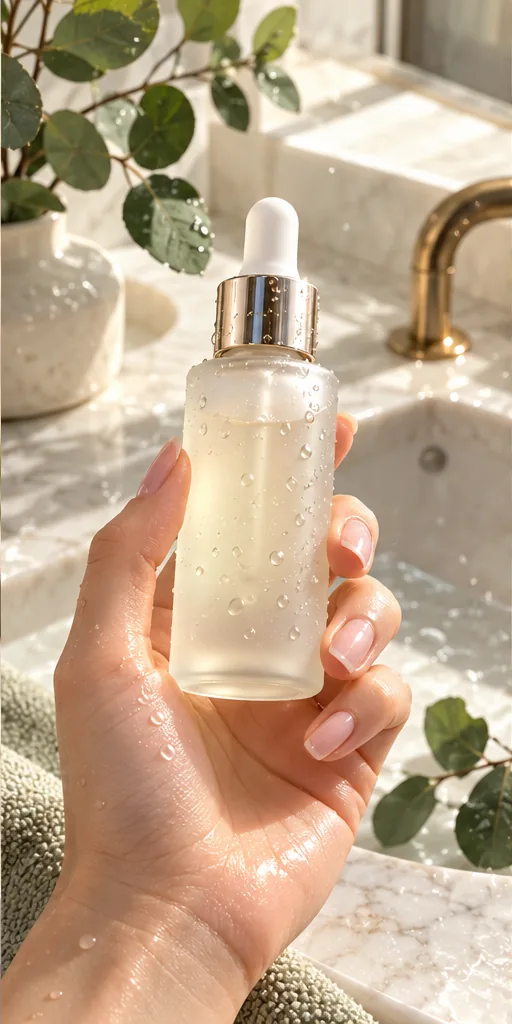 Scroll-Stopping UGC Ad prompt
A first-person UGC-style shot of a hand with a natural manicure holding an unbranded frosted glass serum bottle with a gold dropper, covered in fresh water droplets, above a marble bathroom sink with eucalyptus leaves, like a real customer filming their morning routine. · Commercial Studio Product Photography · Camera: Phone-camera POV at 26mm equivalent, f/1.8, product sharp in the center third, background gently blurred · Lighting: Morning window light as key from the side, white marble as natural bounce, crisp specular highlights on glass and droplets · authentic UGC ad aesthetic, premium but natural, dewy texture, clean label area for your own branding, social-first 4:5 crop, conversion-focused composition --ar 4:5 --no fake brand names, readable text, distorted fingers, extra fingers, harsh flash, cluttered counter, watermark, plastic-looking skinCustomise it in the free studio
For full-scene prompts with a general model, see our Nano Banana prompts for product photography, and for the holiday season, our Christmas product photography ideas.
Which tool fits which Etsy photo?
Etsy doesn't care which tool you use, only whether the result is accurate. This is how the jobs split, based on each tool's published features:
| Listing image | What it needs | Good fit | Watch out for |
|---|---|---|---|
| Required unedited photo | Real item, real background, no edits | Your phone camera | Portrait mode, filters, cropping afterwards |
| Clean hero or catalog images | Real item pixels on a consistent backdrop | Photoroom (cut-out, AI backgrounds, shadows, batch) | Rough edges on fine details |
| Lifestyle and mood scenes | A believable setting around the real item | Photoroom, or an all-in-one generator such as ImagineArt | Generators can redraw the product or get the scale wrong |
| Digital download previews | The actual file content | Screenshots or mockups of the real file | AI previews that show something the file doesn't contain |
| Print-on-demand | Your design on an authorized mockup | Your production partner's mockups | Unlicensed mockup images |
If you also want styled ad visuals or short product videos for social media, ImagineArt puts 50+ image and video models in one dashboard, with studios for ads and fashion. Use it for the scene and the marketing, then check the item in every image against the real one before it goes on Etsy.
Do you have to disclose AI product photos on Etsy?
It depends on what the AI made:
- AI made the product (AI art prints, AI-generated designs): disclosure is required. Etsy's Help Center says sellers "must disclose within their listing description if an item is created with the use of AI", and you can't present AI work as handmade or entirely your own.
- AI only edited the photos of a product you made: Etsy lists this as a best practice, not a requirement. It recommends noting in the description whether images were edited, to be transparent with buyers.
A one-line note costs nothing and heads off "it looked different in the photo" messages: Photo 1 is an unedited photo of the item. Other photos use AI-generated backgrounds; the item itself is unaltered.
Reality check. Better photos can make a shop look more trustworthy, but they don't fix weak demand, pricing or reviews, and nobody can promise a sales lift from new images. Etsy's detection and enforcement are still being rolled out, so the details of how strictly the rule is applied may change; check the Help Center before a big relisting job. Expect AI tools to get fine details wrong some of the time (thin chains, glass, text on labels), which is why the 100% zoom check matters more than the tool you pick.
What should you do with your existing listings?
Etsy's announcement gave no deadline, but coverage from Value Added Resource notes that existing listings are expected to comply too, and detection is set to extend to them over time. A sensible order:
- Start with your best sellers. Open each listing and check for at least one unedited photo of the real item on a real background.
- Reshoot where needed. Batch the reshoots: set up your window light once and shoot ten items in one session.
- Audit the AI images. Remove any image where the color, size or finish doesn't match what you ship, or where flaws were edited out.
- Add the disclosure line to items made with AI (required) and to listings with AI-edited photos (recommended).
- Move on to the rest of the catalog, then use the same setup for every new listing so you never have to redo it.
For the wider listing checklist (titles, image order, what to shoot first), read our AI product photos that sell guide. If you're building a product photo service for other shops, see the AI side hustles hub. You can draft a scene prompt in the free prompt studio or compare more editors in the tool directory.
FAQ
Can I use AI product photos on Etsy?
Yes, as extra images. Since October 2026 most listings must also include at least one unedited photo of the actual item against a real background, and every AI-assisted image must accurately show what the buyer receives.
What counts as an unedited photo on Etsy?
A photo of the actual item against a real background that has not been edited or changed in any way. To be safe, don't crop, filter, retouch or swap the background on that photo; frame it right in the camera.
Can I change the background of my Etsy photos with AI?
Yes, on your other photos. Etsy allows AI tools to change backgrounds, adjust lighting or color, and crop or resize, as long as the item doesn't look different from what you ship.
Do I have to disclose AI-edited photos on Etsy?
Disclosure is required when AI is used to create the item itself. For AI-edited photos of your own product, Etsy recommends noting it in the description as a best practice.
What size should Etsy listing photos be?
Etsy recommends at least 2,000 pixels in width and height, and says a first photo under 635 pixels can rank lower in search. It also recommends horizontal photos with space around the item for thumbnail crops.
Sources
- Etsy Help: How Do Etsy's Listing Image Requirements Apply to My Listings?
- Etsy Help: Requirements and Best Practices for Images in Your Etsy Shop
- Etsy Help: What Can I Sell on Etsy? (AI-generated content)
- PPC Land: Etsy forces sellers to show one unaltered photo in every listing (25 October 2026)
- Digital Commerce 360: Etsy updates AI policy, noting concerns about buyer trust
- Value Added Resource: Etsy Bans AI-Generated Patterns, Tightens Listing Photo Rules
- Photoroom: Sell on Etsy at scale with professional product photos
- Photoroom pricing
- ImagineArt homepage (models and studios)