Some links below are affiliate links. If you buy through them we may earn a commission at no extra cost to you. We only list tools we would use ourselves. How we make money.
The best Nano Banana prompts for product photography read like a photographer's shot brief: what the product is, what it sits on, how it is lit, the camera angle, the one detail that must be sharp, and the aspect ratio. Attach a clean photo of your real product, tell the model to keep its shape, colors, label and logo exactly the same, and change only the scene. That one habit fixes most bad AI product shots.
Below are 15 copy-paste prompts for studio, lifestyle, ad and editing shots. They are built on Google's own templates: the product-shot template on the Google Developers Blog and the March 2026 Nano Banana prompting guide on Google Cloud. After the prompts: which Nano Banana model to pick, how to stop your product from quietly changing, and the Amazon and Google Shopping rules that still apply. This is a research-based guide. We did not run a formal side-by-side test, so treat every prompt as a strong first draft and expect to iterate.
Which Nano Banana model should you use for product photos?
"Nano Banana" is the nickname for Google's Gemini image models, and there are now several. Google's Gemini API docs list them like this (read 1 November 2026):
| Model | API name | What Google says it is for | Use it for |
|---|---|---|---|
| Nano Banana 2.1 | gemini-nano-banana-2.1 | Recommended for new projects | Everyday listing and social images, fast iteration |
| Nano Banana Pro | gemini-3-pro-image | "Professional asset production"; up to 6 object reference images plus style references | Hero shots, ads with text, complex scenes with several products |
| Nano Banana 2 Lite | gemini-3.1-flash-lite-image | Google DeepMind calls it its "fastest, most efficient" image model | Cheap drafts and layout tests |
The family outputs 1K, 2K or 4K images and supports ratios including 1:1, 4:5, 3:4, 9:16 and 16:9. Google's docs cap a single request at 14 reference images. For most sellers the simple rule is: draft in 2.1, switch to Pro for the shots that carry your ads or your homepage.
The Nano Banana product photography prompt formula
Google's official product template has four parts. Fill in the brackets and you have a working prompt:
A high-resolution, studio-lit product photograph of a [product description] on a [background surface/description]. The lighting is a [lighting setup, e.g., three-point softbox setup] to [lighting purpose]. The camera angle is a [angle type] to showcase [specific feature]. Ultra-realistic, with sharp focus on [key detail]. [Aspect ratio].
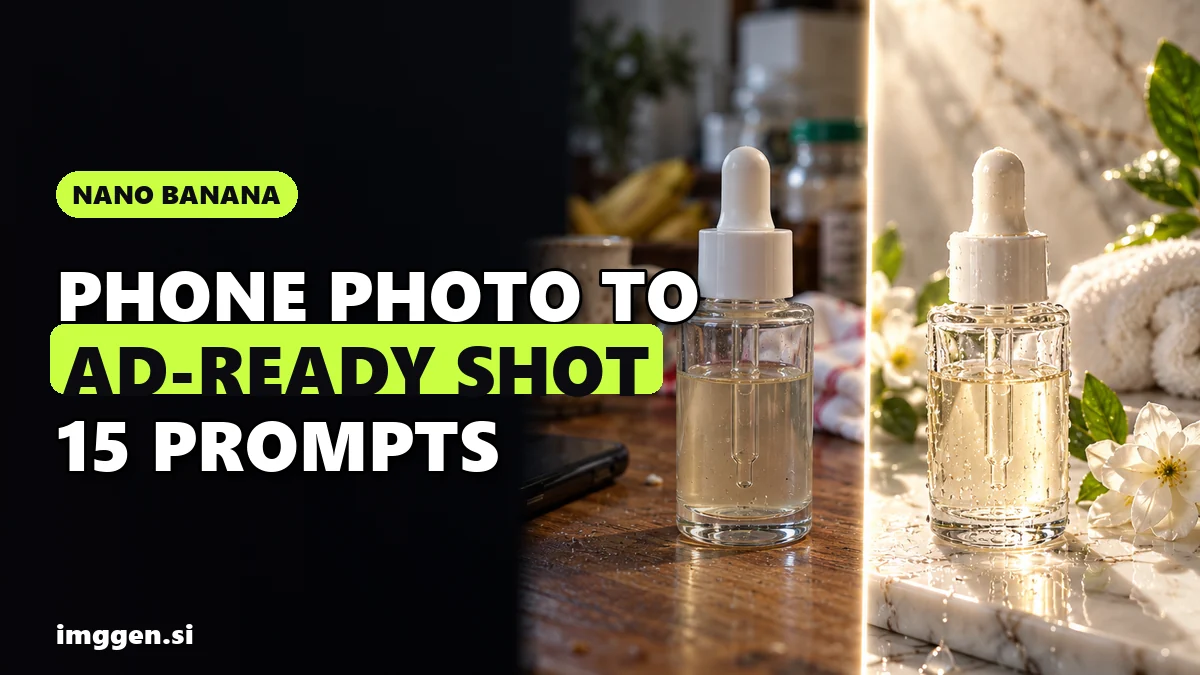
When you attach a photo of your real product (which you should), Google Cloud's guide adds a second formula: [Reference images] + [Relationship instruction] + [New scenario]. In plain words: "Using the attached photo of my product" + "keep the product exactly the same" + "place it in this scene".
Five rules that make the formula work
- Name the material. "Matte black ceramic", "brushed aluminium", "frosted glass" and "navy tweed" give the model texture to render. "Nice bottle" gives it nothing.
- Name the light. Google's guide suggests a "three-point softbox setup" for even product lighting, and "chiaroscuro lighting with harsh, high contrast" or "golden hour backlighting" for drama.
- Use camera words. "Slightly elevated 45-degree shot", "macro lens", "shallow depth of field (f/1.8)" and "85mm lens" all change the result in predictable ways.
- Say what you want, not what you don't. Google recommends positive framing: "an empty marble counter" works better than "no clutter".
- Iterate in the same chat. Google's docs call multi-turn conversation "the recommended way to iterate on images". Fix one thing per turn: "make the shadow softer", "move the product slightly left".
15 copy-paste Nano Banana prompts for product photography
Replace the words in [brackets], attach your product photo, and set the aspect ratio in the tool if it has a setting. Each prompt already includes the "keep it the same" line, because that is the part people forget.
Studio and catalog shots
1. Clean white catalog shot
Using the attached photo of my [product], create a high-resolution, studio-lit product photograph of the exact same product on a pure white seamless background. The lighting is a three-point softbox setup that creates soft, even highlights and a faint natural contact shadow. Straight-on, eye-level camera angle, product centered and filling most of the frame. Keep the shape, colors, label text and logo exactly as in the photo. Square image.
2. 45-degree hero on concrete (adapted from Google's own mug example)
Using the attached photo, create a high-resolution, studio-lit product photograph of my [product] presented on a polished concrete surface. The lighting is a three-point softbox setup designed to create soft, diffused highlights and eliminate harsh shadows. The camera angle is a slightly elevated 45-degree shot to showcase its [clean lines / shape]. Ultra-realistic, with sharp focus on [the logo / the cap]. Keep the product identical to the photo. 4:5 portrait.
3. Macro detail shot
Using the attached photo, create a macro photograph of the [stitching / texture / clasp] of my [product]. Shallow depth of field (f/2.8), sharp focus on the [detail], soft window light from the left, neutral warm-grey background falling into blur. Do not change the material, color or pattern. Square image.
4. Color-block backdrop
Using the attached photo, place my [product] on a seamless [sage green] paper backdrop with a matching [sage green] plinth. Soft single key light from the upper right, gentle shadow falling to the left. Eye-level, centered, minimalist editorial style. Keep the product, label and colors exactly the same. 4:5 portrait.
Lifestyle scenes
5. Morning kitchen counter
Using the attached photo, place my [product] on a light oak kitchen counter next to a window in soft morning light. A linen towel and a small bowl of [ingredient] sit out of focus in the background. Photographed with an 85mm lens, shallow depth of field, warm natural tones, realistic reflections on the counter. The product stays sharp and unchanged. 4:5 portrait.
6. Bathroom shelf for skincare
Using the attached photo, place my [skincare bottle] on a white marble bathroom shelf beside a folded cream towel and a small green plant. Bright, diffused daylight, clean spa mood, slight water droplets on the marble. Eye-level shot, product in the left third of the frame. Keep the bottle shape, cap and label text exactly as in the photo. 4:5 portrait.
7. In-hand scale shot
Using the attached photo, show my [product] held in a relaxed adult hand with natural skin texture and short neutral nails, against a softly blurred [café / living room] background. Natural daylight, the product facing the camera so the label is readable. Keep the product's size realistic and its design unchanged. 4:5 portrait.
8. Gift flat lay
Using the attached photo, create a top-down flat lay of my [product] on a [cream linen] surface, surrounded by kraft gift wrap, twine, a blank paper gift tag and a few dried orange slices. Even overhead softbox light, soft shadows, plenty of breathing room around the product. The product is the clear focal point and stays exactly as in the photo. Square image.
Ad and social creatives
9. Splash shot
Using the attached photo, create a dynamic high-speed photograph of my [drink can / bottle] with clear water splashing around it and fresh [lime slices and mint] frozen mid-air. Dark background, strong rim light from both sides, crisp droplets. The product stays upright, sharp and identical to the photo. 9:16 vertical.
10. Dark luxury set
Using the attached photo, place my [perfume bottle] on wet black stones with a sprig of [cedar], against a pure black background. Chiaroscuro lighting with harsh, high contrast; a warm spotlight makes the glass glow amber. Low-angle shot, macro detail on the water droplets. Keep the bottle shape, cap and engraving exactly the same. 9:16 vertical.
11. Ad with exact text (text-rendering rules from Google's guide: put the words in quotes and name the font)
Using the attached photo, create a glossy commercial shot of my [product] on a warm beige studio background with soft, radiant light. Next to the product, render two lines of text: the word "NEW" in a bold, white, sans-serif font, and below it "[Your product name]" in a thin, minimalist sans-serif font. Keep the product identical to the photo. 1:1 square.
12. Story ad with room for copy
Using the attached photo, place my [product] in the lower third of a 9:16 vertical frame on a [terracotta] surface, with a clean, softly lit [peach] gradient wall filling the upper two-thirds as empty space for headline text. Soft side light, gentle shadow. Keep the product exactly as in the photo.
Edits to photos you already have
13. Swap only the background (Google's inpainting template)
Using the provided image, change only the background to a sunlit [terrazzo countertop with a blurred plant behind it]. Keep the product exactly the same, preserving its shape, colors, label, lighting direction and composition.
14. Clean up a phone photo
Using the provided image, remove the dust, fingerprints and the reflection of my phone from the [glass jar]. Keep everything else in the image exactly the same, preserving the original style, lighting and composition.
15. Fix the light
Using the provided image, relight the scene with soft, diffused light from a large window on the left and a gentle shadow to the right. Do not change the product, its colors or the background objects.
Want a ready-made brief for a scroll-stopping product ad? Start from this one:
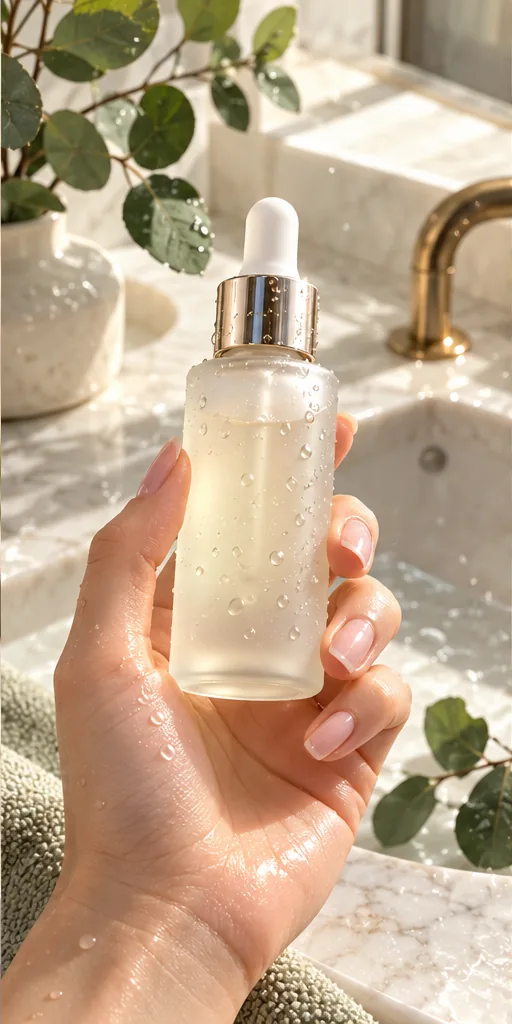 Scroll-Stopping UGC Ad prompt
A first-person UGC-style shot of a hand with a natural manicure holding an unbranded frosted glass serum bottle with a gold dropper, covered in fresh water droplets, above a marble bathroom sink with eucalyptus leaves, like a real customer filming their morning routine. · Commercial Studio Product Photography · Camera: Phone-camera POV at 26mm equivalent, f/1.8, product sharp in the center third, background gently blurred · Lighting: Morning window light as key from the side, white marble as natural bounce, crisp specular highlights on glass and droplets · authentic UGC ad aesthetic, premium but natural, dewy texture, clean label area for your own branding, social-first 4:5 crop, conversion-focused composition --ar 4:5 --no fake brand names, readable text, distorted fingers, extra fingers, harsh flash, cluttered counter, watermark, plastic-looking skinCustomise it in the free studio
How do you stop Nano Banana from changing your product?
This is the real problem with general image models, and it is worth being honest about. In a March 2026 comparison on its own blog, Photoroom says Nano Banana darkened a dress, "obscuring critical product details", and produced a shadow that "misrepresents how the product was photographed". Photoroom sells a competing workflow, so read that as a vendor claim, not an independent test; the same post says Photoroom itself uses Nano Banana for some features. But the risk is real: a generator can redraw your label, shift a color or add a seam that doesn't exist, and a buyer who receives something different from the photo leaves a bad review.
Five habits reduce it:
- Start from a sharp, evenly lit photo of the real product. Phone photos are fine; blurry, dark ones are not.
- List what must not change in every prompt: shape, color, label text, logo, size.
- Zoom to 100% and compare the label, logo and color against the original before you publish anything.
- Edit, don't regenerate. If one thing is wrong, fix it in a follow-up turn ("change only the cap back to gold") instead of rerolling the whole image.
- For catalog volume, use a product-locked tool. Tools that cut out your real product and generate only the scene around it keep the product's own pixels.
That last point is where a dedicated product editor earns its place. If you list dozens of SKUs, or your product has fine print, cutting out the real photo and generating only the backdrop is safer than asking any model to redraw it.
Photoroom's AI Backgrounds tool generates a scene from your own prompt and says it aligns "angles, lighting, and shadows for a natural result"; Batch applies the same look across a catalog. The free version covers removing and generating backgrounds, while batch editing and high-resolution exports need a paid plan, so check the current price on its pricing page.
Can you use Nano Banana product photos on Amazon and Google Shopping?
Yes, with limits. The rules are about what the image shows, not which tool made it:
- Amazon main image: an Amazon staff post on Seller Forums lists a pure white background (RGB 255,255,255), the product filling 85% or more of the frame, no props that aren't included, no extra text, graphics or watermarks, and at least 1,000 pixels on the longest side. AI "white" backgrounds are often slightly off-white, so check the pixel values or run the image through a background remover. Lifestyle prompts 5 to 12 belong in secondary images.
- Google Merchant Center: images made with generative AI must keep metadata showing they are AI-generated, such as the IPTC DigitalSourceType tag, so don't strip it. Product images also can't carry promotional text, prices, "Free shipping" or calls to action, so prompt 11 is for ads, not your Shopping feed.
- Built-in labels: Google says Nano Banana images carry a SynthID watermark and C2PA Content Credentials. Don't try to hide them; just make sure the image shows the product honestly.
The honest-use rule underneath all of this: an AI scene is fine, an AI product that differs from what you ship is not. For a broader listing checklist, see our AI product photos that sell guide, and for holiday scenes, our Christmas product photography ideas.
Where can you run these prompts?
You can use Nano Banana directly in the Gemini app or Google AI Studio (limits depend on your plan). Creator platforms add it next to other models, which helps when one model struggles with your product:
| Where | Nano Banana versions listed | Extras for product shots | Cost |
|---|---|---|---|
| Gemini app / AI Studio | Google's current models | Multi-turn editing, API for batches | Depends on your Google plan |
| ImagineArt | Nano Banana Pro, Nano Banana 2.1 | 50+ models, Fashion Studio for on-model and e-commerce shots | Free plan to start; check current price |
| getimg.ai | Nano Banana 2.1, Nano Banana Pro | Remove Background, Relight, Product orbit (360° video from a few photos) | Paid credit plans; check current price |
| Photoroom | Uses Nano Banana for select features, alongside its own models | Background removal, AI backgrounds, shadows, Batch | Free version; paid for batch and high-res |
If you want to run the same prompt through Nano Banana Pro and a few other models and keep the best result, ImagineArt puts them in one dashboard and lets you start on its free plan.
getimg.ai is the better fit if you also want product-specific AI Actions, such as Relight and a 360° product orbit video, on one credit balance.
To build your own prompt step by step, try the free prompt studio, or compare more tools in the tool directory.
Reality check. Expect to generate several versions before one is listing-ready, and expect small product errors in some of them: a misspelled label, a slightly wrong color, an extra seam. AI scenes replace the backdrop and the props, not the need for one good photo of the real product. Better photos can make a listing look more trustworthy, but they don't fix price, reviews or demand, and nobody can promise a specific lift in sales from new images.
A 20-minute workflow for your next listing
- Shoot one clean photo (5 min): product on a plain table, soft window light, phone at product height.
- Make the main image (5 min): prompt 1, then check the background is pure white and the product fills the frame.
- Make three secondary images (5 min): one lifestyle scene (prompts 5 to 8), one detail (3), one scale shot (7).
- Check every image at 100% (3 min): label, logo, color, size. Fix with an edit prompt, not a reroll.
- Export for each channel (2 min): square for marketplaces, 4:5 for feeds, 9:16 for stories and ads (prompts 9 and 12).
Do this for your best-selling product first. If the new images look right next to the real thing, roll the same prompts out to the rest of the catalog. To turn the stills into short video ads next, see how to make AI UGC ads.
FAQ
What is the best prompt for product photography in Nano Banana?
Use Google's template: product and material, background surface, lighting setup, camera angle, the detail that must be sharp, and the aspect ratio. Attach a photo of the real product and say the shape, colors and label must stay exactly the same.
Which Nano Banana model is best for product photos?
Google's Gemini API docs recommend Nano Banana 2.1 for new projects and Nano Banana Pro for professional asset production. Draft in 2.1 and use Pro for hero shots and ads with text.
Can Nano Banana keep my product exactly the same?
Not always. General image models can shift colors or redraw labels, so compare every result at 100% zoom, fix errors with edit prompts, and use a cut-out tool such as Photoroom when exact product pixels matter.
Can I use AI product photos on Amazon?
Yes, if they show the real product accurately and follow Amazon's rules: the main image needs a pure white background, the product filling at least 85% of the frame, and no extra text or props.
Are Nano Banana images watermarked?
Google says Nano Banana images include an invisible SynthID watermark and C2PA Content Credentials. Google Merchant Center also asks you to keep AI metadata such as IPTC DigitalSourceType.
Sources
- Google Developers Blog: How to prompt Gemini 2.5 Flash Image Generation for the best results
- Google Cloud Blog: The ultimate prompting guide for Nano Banana (March 2026)
- Gemini API docs: Image generation (Nano Banana models)
- Google DeepMind: Gemini Image models
- Photoroom blog: Photoroom vs Gemini (March 2026)
- Photoroom AI Backgrounds
- Amazon Seller Forums: main image requirements (Amazon staff post)
- Google Merchant Center: Image link [image_link] requirements
- ImagineArt homepage (models and Fashion Studio)
- getimg.ai homepage (models and AI Actions)