Some links below are affiliate links. If you buy through them we may earn a commission at no extra cost to you. We only list tools we would use ourselves. How we make money.
To make AI UGC ads, write a 15-second script (a hook, one proof point and a clear ask), add a clean photo of your product, pick an AI creator, either an avatar from a library or your own digital twin, and let an ad tool such as ImagineArt Ad Studio or Higgsfield Marketing Studio generate a phone-style 9:16 video. Then add your price and captions yourself, label the ad as AI where the platform asks, and test three to five versions. Generating takes minutes. Deciding what to say and checking every frame takes longer.
Can you do it for free? Partly. Free tiers are fine for testing a script and a look, but the free plans we checked have limits that matter for ads: watermarks, 720p exports or non-commercial licences. This guide covers both workflows, a $0 test run and a paid production run, plus hook formulas, how to get an AI creator to hold your product, a tool comparison and the disclosure rules that keep your ad account safe. It is built from the tools' official pages and documentation, not from a hands-on benchmark.
What is an AI UGC ad, and which formats work?
UGC stands for user-generated content: videos that look like a real person filmed them on a phone, not like a studio commercial. An AI UGC ad recreates that look with a generated presenter, generated hands or generated product motion. For a small brand the appeal is simple: no creator fees, no shipping samples, no reshoots, and a new hook in minutes instead of days.
Most tools offer the same formats. Higgsfield's Marketing Studio guide lists eight UGC styles (Shopping, At home, Delivery, Review, Try-on, Unboxing, Tutorial and Before/after), and ImagineArt's Ad Studio page names formats such as UGC, Unboxing, Virtual Try-On, ASMR, Tutorial and Review. Here is how they compare for a first ad:
| Format | What the viewer sees | Good for | Watch out for |
|---|---|---|---|
| Talking-head review | A presenter explains one benefit to camera | Skincare, gadgets, apps, services | Lip-sync and voice; the presenter must not pose as a real customer |
| Unboxing | Hands open a parcel and reveal the product | Gifts, accessories, subscription boxes | Packaging and logos can warp |
| Try-on | A person wears or uses the product | Clothing, jewellery, eyewear | Fit and colour must match the real item |
| Tutorial | Quick steps showing the product in use | Beauty, kitchen, tools | Hands and small moving parts |
| Before/after | A problem, then the result | Cleaning, organising, apps | The "after" must be a result the product really delivers |
| Faceless product motion | The product alone, moving through a scene | Anything with a strong look | Less human, so the hook has to work harder |
If you are new, start with a talking-head review or an unboxing. They are what people expect from UGC, and they make it easy to test one hook against another.
Can you make AI UGC ads for free?
You can plan and test for free, but publishing a clean ad usually costs something. These are the limits listed on the official pages today:
- ImagineArt: the free plan gives you 100 credits a day with no credit card. ImagineArt's video generator page lists it as "in-house models only" with 720p exports, and says free-plan downloads come with non-commercial use, while paid-plan videos are cleared for commercial use. An ad is commercial use, so treat the free plan as a test bench.
- Higgsfield: its help center says the free tier is limited to a small set of models and doesn't include credits, and that paid plans include watermark-free downloads.
So the honest $0 workflow is a rehearsal, not a production line:
- Write three hook lines and one script (formulas below).
- Photograph the product on your phone in daylight from two to four angles.
- Use free credits to generate a few still frames of your presenter and setting, so you know the look works before you pay for video.
- Show the stills and the hooks to a handful of people who match your buyer, and ask which one would make them stop scrolling.
Then pay only for the final video generations. Your credits go into the version people already reacted to, not into experiments.
| $0 test workflow | Paid production workflow | |
|---|---|---|
| Goal | Check the script, look and hook | Publish ads you can actually run |
| Output | Stills, drafts, a final script | 9:16 videos with voice, lip-sync and captions |
| Typical limits | Daily credit caps, fewer models, lower resolution, watermarks or a non-commercial licence | Credits per generation; video is the expensive part |
| Use it for | Deciding what to make | Making three to five variants to test |
How to make an AI UGC ad, step by step
This is the paid workflow for one product, assembled from ImagineArt's and Higgsfield's documentation. Plan an afternoon for the first ad. The second goes much faster because you reuse the creator, the script structure and the product images.
Step 1: Get clean product photos
Every ad tool starts from your product images, and every flaw gets copied into the video: a dusty surface, a cut-off label, a colour cast. Shoot on a plain surface in daylight, then remove the background so the AI gets the product and nothing else. Photoroom is built for this step, with background removal, AI backgrounds and batch editing for a whole catalogue. Its Max and Ultra plans also include a Video Ad Maker that turns up to four product photos into a 5, 8 or 10 second UGC or product video. Our guide to AI product photos that sell covers the photo side in detail.
Step 2: Write a 15-second script: hook, proof, ask
Write the script before you open a generator. Short UGC ads work in three beats:
- Hook (0 to 2 seconds): one line that names a problem or a surprise.
- Proof (2 to 12 seconds): one concrete reason, shown on screen: the texture, the size in a hand, the result.
- Ask (last 3 seconds): what to do next, plus your real offer if you have one.
Hook formulas you can adapt:
- "If your [problem] looks like this, watch this."
- "Three things nobody tells you about [product type]."
- "Stop scrolling if you [specific situation]."
- "Here's how [product] works in ten seconds."
- "POV: you finally found a [product type] that [benefit]."
Notice what is missing: lines like "I've used this for a month and my skin cleared up." An AI presenter never used your product, and presenting it as a customer is the one thing to avoid (see the rules section below). Let the avatar present, demonstrate and explain. Example for a water bottle:
Hook: "If your water bottle still smells like yesterday's coffee, watch this." Proof: the presenter unscrews the wide lid, rinses it in one pass, close-up of the clean steel inside. Ask (your on-screen text, not the AI's): "[Your offer]. Link below."
Step 3: Choose your AI creator
- Library avatar: the fastest option. ImagineArt's Ad Studio page lists 40+ avatars across demographics, aesthetics and tones. In Higgsfield you can pick a gallery avatar, generate one from a text prompt or attach an AI Influencer you have already built.
- Your own face: a digital twin of yourself keeps a founder-led feel without filming every ad.
- Another real person: only with their permission. Higgsfield's terms forbid uploading another person's image without consent, and its UGC guide says to use photos you own or have permission to use.
Whatever you pick, keep it. Higgsfield's help center notes that reusing the same avatar across variations keeps the same face in every ad, which also makes your tests cleaner. Our consistent character guide explains why faces drift and how to stop it.
Step 4: Generate the video
In ImagineArt Ad Studio, you paste a product page URL (the studio pulls the product images and copy to build the script) or upload product images, choose a format and a hook, pick an avatar, background and prompt, then generate. ImagineArt says one session can produce 20 to 50 variations for A/B testing, with exports sized 9:16 for TikTok and Reels, 1:1 for feeds, 4:5 for Meta in-feed and 16:9 for YouTube. Scripts and lip-sync work in several languages, which helps if you sell abroad.
In Higgsfield Marketing Studio, you pick a template, upload a product image that replaces the product in the template and click Recreate, or paste a product link and let it build a TikTok, Reels or Shorts ad. Clips run up to 15 seconds and you can generate up to four variants at a time. Higgsfield's August 2026 UGC guide lists 52 to 142 credits per UGC video, about $2.60 to $7.10 at its stated rate of roughly 20 credits per dollar. Prices change, so check the current price: the exact credit cost appears on the button before you confirm.
Step 5: Review every frame, then add the text yourself
- Does the product match the real one: shape, colour, label and size?
- Do the hands, fingers and product edges stay clean when they move?
- Does the voice match the lips? Higgsfield's help center says voiceover and pacing in UGC videos can vary from one generation to the next.
- Does the script make any claim you cannot back up?
Generate the clip without prices or offer text, then add the offer, captions and logo in your editor, because AI video still mangles small text. Keep text away from the top and bottom of the 9:16 frame, where the platform's buttons sit, and burn in captions for people watching on mute.
Step 6: Make variants that change one thing
Higgsfield's guide suggests changing one variable per batch, for example only the opening line. Good first tests: three hooks with the same avatar, then the winning hook with two different avatars, then faceless against talking head. Let the ad platform's numbers pick the winner, not your favourite.
How do you make the AI creator hold your product?
"AI UGC with product in hand" is one of the most searched variations, because it is where AI ads break most often: the bottle changes shape, the label turns into gibberish, fingers melt into the packaging. What helps:
- Start from a template built for handling. Unboxing, Try-on and Review styles are designed around a person interacting with a product, so the tool already expects hands in the frame.
- Give it several clean angles. Photoroom's ad maker recommends several angles of the same product for better results. The more the model sees, the less it has to invent.
- Make the first frame a still. If your tool can start a video from an image (ImagineArt's video generator can), create or edit a still of the presenter holding the product first, fix the label there, then animate that frame. Fixing one image costs less than regenerating a video.
- Keep the product big and the movement small. A slow lift toward the camera gives the model less to get wrong than a spin or a toss.
- Know when to switch formats. If the label still warps after a few tries, use a faceless product-motion clip for the proof beat and keep the presenter for the hook.
Need a first frame? This prompt brief gives you a phone-style, hand-held product shot you can animate or run as a static ad:
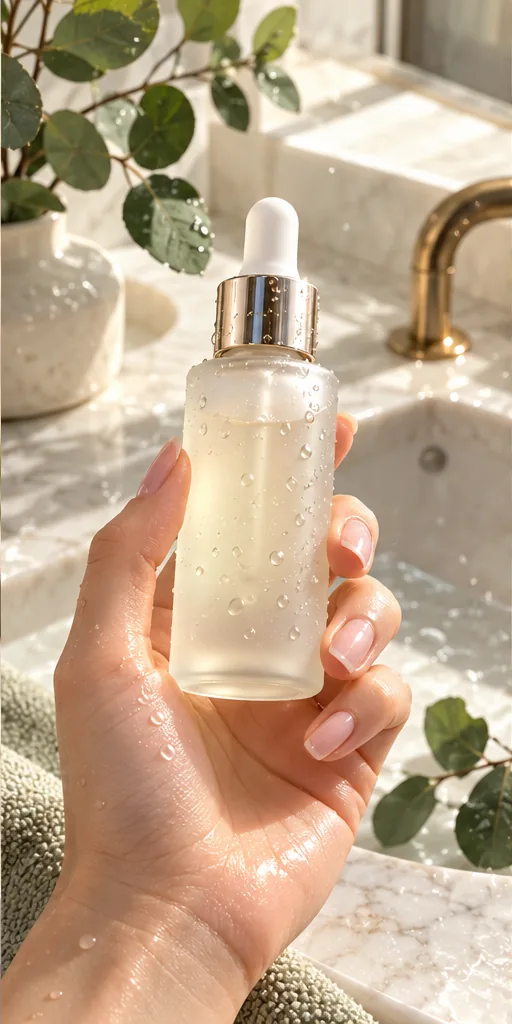 Scroll-Stopping UGC Ad prompt
A first-person UGC-style shot of a hand with a natural manicure holding an unbranded frosted glass serum bottle with a gold dropper, covered in fresh water droplets, above a marble bathroom sink with eucalyptus leaves, like a real customer filming their morning routine. · Commercial Studio Product Photography · Camera: Phone-camera POV at 26mm equivalent, f/1.8, product sharp in the center third, background gently blurred · Lighting: Morning window light as key from the side, white marble as natural bounce, crisp specular highlights on glass and droplets · authentic UGC ad aesthetic, premium but natural, dewy texture, clean label area for your own branding, social-first 4:5 crop, conversion-focused composition --ar 4:5 --no fake brand names, readable text, distorted fingers, extra fingers, harsh flash, cluttered counter, watermark, plastic-looking skinCustomise it in the free studio
You can adjust it in the free prompt workbench before you spend any credits.
Which AI UGC ad tool should you use?
| Tool | Best for | Input | What to know |
|---|---|---|---|
| ImagineArt Ad Studio | Many variations fast, ads in several languages, every placement size | Product URL, product images or an ad reference | 40+ avatars and 9 formats; exports 9:16, 1:1, 4:5 and 16:9; the free plan is for testing only (non-commercial downloads) |
| Higgsfield Marketing Studio | Phone-style UGC with one consistent avatar, plus product shots and posters | Product link, product images, a template or an ad reference | Up to 15 s per clip and 4 generations at a time; to change a video you generate it again |
| Photoroom Video Ad Maker | Sellers who already clean their photos in Photoroom | Up to 4 product photos | 5, 8 or 10 s; editable script and AI voiceover; 9:16 and 16:9; Max and Ultra plans only |
A simple rule: if you need volume and languages, start with ImagineArt; if you want one recurring face across many ads, start with Higgsfield; if your store photos already live in Photoroom, try its ad maker first. The tool directory lists every engine we cover, and our Black Friday video ads guide turns this workflow into a four-week holiday plan.
Are AI UGC ads allowed on TikTok and Meta?
Yes, with labels and one hard line. From the platforms' and the FTC's own pages:
- TikTok: TikTok Ads Manager lists "AI-generated, synthetic, or manipulated media" under mandatory disclaimers. That covers images, video or audio that are completely AI-generated, and real material significantly modified by AI. The disclaimer is a text label at the bottom of the in-feed video. TikTok says the feature may not be visible to every advertiser and asks you to contact your sales representative if you cannot find it.
- Meta (Facebook and Instagram): in a June 2026 update, Meta moved its "AI info" label into the "About this ad" menu for ads made with its own generative AI tools, and said it will automatically detect ads made with third-party AI tools through industry-standard signals and label them there too.
- The FTC's fake-review rule (U.S.): the FTC's 2024 rule bans reviews and testimonials that misrepresent that they come from someone who does not exist, and it names AI-generated fake reviews as an example. An avatar saying "I bought this and love it" is exactly that. An avatar presenting and demonstrating the product is a spokesperson. Keep it a spokesperson.
This is a summary, not legal advice. Rules differ by country and change often, so check the current policy in your ad account before you publish.
Reality check. AI UGC tools remove the filming, not the work. Expect several generations before one is usable: products change shape, labels blur, hands go wrong and voices drift, and every retry costs credits. Ad spend comes on top. A good-looking AI ad cannot fix a weak offer or a slow store, and many first campaigns lose money while you learn what your audience responds to. If you plan to sell AI UGC ads to brands as a service, most beginners earn little or nothing at first; build a small portfolio from your own products or a friend's before you pitch, and read our AI side hustles guide for how that kind of service gets started. Start with a test budget you can afford to lose, and scale only what the numbers support.
What should you do today?
Pick one product. Take four clean photos, write three hook lines with the formulas above, and use free credits on still frames until the presenter and setting look right. Then generate three short videos that differ only in the hook, add your own captions and offer, and label them as AI. Whichever hook keeps people watching past the first two seconds becomes the template for every ad after it.
FAQ
Can I make AI UGC ads for free?
You can test for free. ImagineArt's free plan gives 100 credits a day, but free downloads are for non-commercial use at 720p, and Higgsfield's free tier has no credits while watermark-free downloads come with paid plans. Plan to pay for the final ad videos.
How long should an AI UGC ad be?
Most short-form UGC ads run 8 to 15 seconds: a hook in the first two seconds, one proof point and a clear ask. Higgsfield Marketing Studio clips run up to 15 seconds, and Photoroom's Video Ad Maker offers 5, 8 or 10 seconds.
Do AI UGC ads need an AI label?
On TikTok, the AI-generated content disclaimer is mandatory for ads that are fully AI-generated or significantly modified by AI. Meta shows an AI info label in About this ad and says it detects ads made with third-party AI tools.
Can an AI avatar give a testimonial in an ad?
No. In the U.S., the FTC's rule bans testimonials that misrepresent that they come from someone who does not exist, including AI-generated ones. Let the avatar present and demonstrate the product instead of claiming to be a customer.
What is the best AI UGC ad generator?
It depends on the job: ImagineArt Ad Studio for many variations and several languages, Higgsfield Marketing Studio for one consistent avatar across many ads, and Photoroom's Video Ad Maker if your product photos already live in Photoroom.
Sources
- ImagineArt AI Ad Studio
- ImagineArt AI Video Generator (free plan details and image-to-video)
- ImagineArt AI UGC Creator
- Higgsfield blog: How to Make AI UGC Videos for Marketing in 2026 (Aug 20, 2026)
- Higgsfield Help Center: How do I use Marketing Studio to create video ads?
- Higgsfield Help Center: How do Higgsfield plans work?
- Higgsfield Help Center: Who owns my generations and can I use them commercially?
- Photoroom Video Ad Maker
- TikTok Ads Manager: About ad disclaimers
- Meta: Expanding GenAI Transparency for Meta's Ads Products (updated June 2026)
- FTC: Final rule banning fake reviews and testimonials