Some links below are affiliate links. If you buy through them we may earn a commission at no extra cost to you. We only list tools we would use ourselves. How we make money.
Can you make money 3D printing with AI? Yes, but the money comes from products people already buy: personalised figurines, pet figures, tabletop minis, cosplay props, desk toys and gifts, plus selling the model files. The AI part replaces the slowest step, sculpting the model. You draw or generate a concept image, turn it into a 3D model with an image-to-3D tool like Tripo, clean it up, print it and sell the result. Your printer, your slicer settings and how you treat customers still decide whether a sale turns into a good review.
What gets new sellers into trouble is usually the rules, not the printing. Etsy says 3D-printed items have to come from the seller's own original design. MakerWorld wants real photos of the printed object and a label on AI-generated models. Free plans on AI 3D generators often don't include commercial use. Below: what sells, the image-to-3D-to-print workflow step by step, the rules that decide whether your shop survives, and how to price a print without guessing.
What 3D prints sell, and where AI actually helps
AI won't create demand. It makes it cheaper to say yes to a custom order that would otherwise take days of sculpting. The categories below share one trait: buyers want something specific, so a one-off design is the product, not a hurdle.
| Product | Why people buy | Where AI helps | Main rule risk |
|---|---|---|---|
| Pet figurines from a photo | Emotional gift, often a memorial | Image-to-3D from the customer's photo, then stylise | Low, as long as the customer owns the photo |
| Custom "action figure" of a person | The viral blister-pack trend, now in physical form | AI head or full figure from a reference image | Likeness: only with the person's consent |
| Original tabletop minis and monsters | Gamers buy by the army and the theme | Fast concept-to-mesh for creature variants | Copying a named game's characters |
| Cosplay props and helmets | Event deadlines, sized to the wearer | Blocking out the base shape to refine | Props from films, games and anime are IP |
| Desk toys and designer-vinyl style figures | Impulse buys, gifts, shelf decor | Many character variants from one style | Low if the characters are original |
| STL / 3MF files | Makers with printers want designs, not plastic | Faster design output | Platform AI labels and photo rules |
A pattern runs through that table: original characters and customer-supplied subjects are safe ground, while anything built on someone else's brand is where shops get closed. The trend that put this topic on everyone's feed, AI action figures, shows both sides. Makers are combining printable articulated bodies such as Dummy 13 with AI-generated heads. Dummy 13's MakerWorld page says prints can be sold under CC BY 4.0 if you give proper attribution, and that this permission doesn't automatically cover other people's remixes. How to build one is in our guide to printing an AI action figure.
The image-to-3D model for 3D printing workflow, step by step
Here's the full chain for a custom figure or desk toy, based on Tripo's published features and export options. The specifics are research from official pages, not our own print log, so do a test print before you sell anything.
1. Make a clean concept image
Image-to-3D works best from one clear subject: full body, neutral pose, plain background, even light, nothing cropped. A busy scene or a dramatic pose gives the model less to work with. If the customer sends a pet photo, crop it to the animal and fix the lighting first. For an original character, generate a front-facing concept in an image tool and keep the design chunky. Thin parts like whiskers, swords and loose hair strands break on small prints.
You can start from this brief and change the subject:
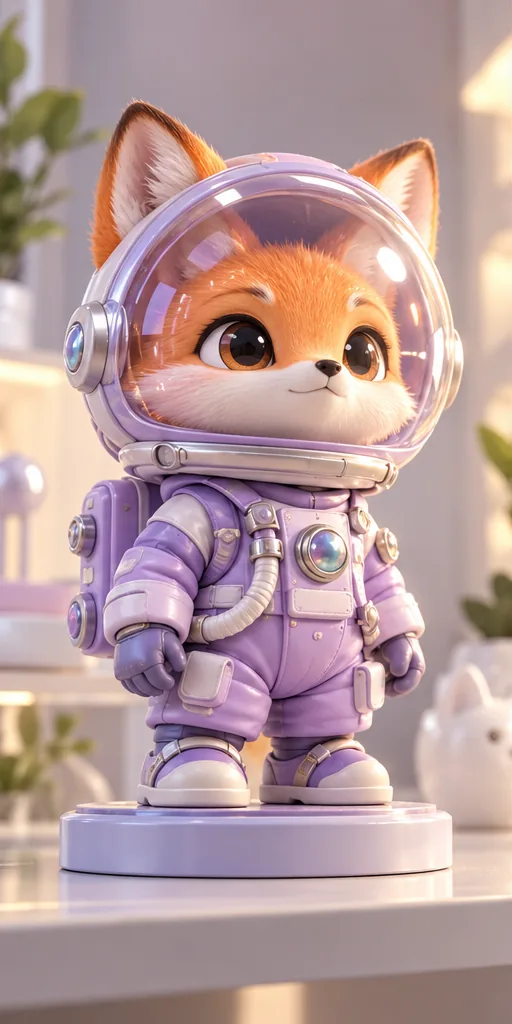 Collectible Vinyl Toy prompt
An original designer vinyl collectible, a chunky fox astronaut with big glossy eyes inside a clear bubble helmet, wearing a matte pastel lilac spacesuit with iridescent buttons, standing on a round display base on a clean shelf like a limited-edition art toy. · Commercial Studio Product Photography · Camera: 100mm macro at f/4, tabletop height, shallow depth of field so the shelf melts away · Lighting: Large softbox key from front-left, white bounce fill, pastel lilac rim highlights on the helmet · designer art toy, chibi proportions, smooth 3D-printable shapes, matte vinyl and glossy resin materials, clean display base, collectible shelf aesthetic, ready for image-to-3D and printing --ar 4:5 --no thin fragile parts, floating pieces, blister pack text, brand logos, copyrighted characters, watermark, dusty, cluttered backgroundCustomise it in the free studio
If you don't have an image generator yet, an all-in-one app with many models makes it easy to get a few concept variants for the customer to choose from.
2. Turn the image into a 3D model
Tripo turns a single image, several views (multiview) or a text prompt into a textured 3D model in the browser. For printing, multiview input is worth the extra minute: front, side and back views give the model real information about the parts a single photo can't show. Tripo also lists Smart Mesh, which produces clean quad or triangle topology at a polygon count you set. That helps when you need to repair or edit the mesh afterwards.
3. Export in a print format
Tripo exports STL and 3MF, the two formats slicers use, along with OBJ, FBX, GLB and USD. 3MF can store units, scale and colour data, while an STL is just geometry, so the size of an STL can come out wrong when you import it. Whichever you use, set the real size in the slicer (for example 10 cm tall) before you think about anything else.
4. Check and repair before you print
Tripo's marketing calls its meshes watertight and print-ready, and in a May 2026 comparison All3DP found that Tripo beat Meshy and Hitem3D for accuracy from image to print-ready 3MF. Still, treat every AI mesh as a draft. Check for:
- Thin walls and spikes that won't survive printing at your target size.
- Floating or intersecting pieces such as separate eyes or accessories that need to be merged or cut flat.
- A flat, stable base, or plan to add a round display base yourself.
- Overhangs that will need supports and leave marks in visible places.
- Mangled small details like hands, faces and text, which AI often gets wrong. Repair or sculpt these by hand.
Run the slicer's mesh repair, check the preview layer by layer, and print one small test piece. If you want to rig a character or reuse it as a game asset too, our image-to-3D character guide covers that side.
5. Photograph the real print
Use photos of the object you actually printed, not the AI concept image or a render. That's good practice, and on some platforms (below) it's required.
The rules that get 3D print shops banned
This is the part most "make money with AI" videos skip. Each rule below comes from the platform's own pages or from reporting on them. Policies change, so reread them before you list.
Etsy: your own original design
Etsy's Creativity Standards sort items into made by, designed by, handpicked by and sourced by a seller. The section on items produced with computerized tools, which names laser printers, 3D printers, CNC and Cricut machines, says they must be produced from the seller's own original design and notes they are often personalised to a buyer's specification. The June 2025 rewrite removed the earlier wording that allowed templated designs or patterns, as Value Added Resource reported. In practice:
- Printing other people's STLs from MakerWorld, Printables or Thingiverse and selling them on Etsy doesn't fit this category, even if the file's licence allows commercial use.
- AI-assisted designs you created can qualify, but Etsy also says sellers must disclose in the listing description when an item was created with AI. Do it.
- Custom work, like a figure of the buyer's own pet, matches the standard best.
MakerWorld: real print photos and AIGC labels
Bambu Lab's MakerWorld AI policy asks creators to label models that are mostly or fully AI-generated as AIGC. Wrongly labelled models can lose visibility or be removed, and AI-generated images aren't allowed as model images. A model image rule in force since February 2026, as reported by 3DRuck, requires at least one real photo of the printed object that matches the uploaded file. Models without one can have their visibility restricted. The reason is listings that showed a polished AI image the downloadable model didn't actually match.
Printables: AI-labelled models can be hidden
On Printables, users can filter out AI-generated models and hide AI content in their settings, according to users on Prusa's forum. Label honestly, and expect some of your audience to have AI models switched off. Read Printables' upload guidelines before you publish.
IP and likeness
An AI tool will happily turn a screenshot of a famous character into a printable mesh. That doesn't make it yours. Characters from films, games, anime and toy lines, team logos and brand names are the most common reasons for takedowns on marketplaces, and repeated reports can end a shop. Faces have their own risk: make a figure of a real person only from photos that person (or a parent or guardian) has sent you for that order, and never of a celebrity.
Your generator plan's licence
Check the plan before you sell anything made with it. Tripo's pricing page today lists its Free plan as "Public Models · Non-Commercial Use" and the paid Professional, Max and Team plans as "Private Models · Commercial Use". If you sell figures or files, the models you sell need to come from a paid plan. Private models also stop people from downloading the design you're selling. Check the current price on Tripo's pricing page.
How to price a 3D print (the factors, not a magic number)
Most new shops undercharge because they only count plastic. A price that works covers every one of these factors:
- Material: the grams of filament or millilitres of resin from your slicer, times your cost per gram or millilitre, including supports and purge waste.
- Machine time: print hours times an hourly rate that covers electricity, nozzle and FEP or plate wear, and eventually a new printer.
- Failure rate: if one print in five fails, every good print pays for a quarter of a failed one. Tall, thin figures fail more often than chunky desk toys.
- Your design and cleanup time: concept, generation, mesh repair, support removal, sanding, painting. For custom figures this is usually the biggest cost and the easiest to forget.
- Generator credits: your monthly AI plan spread across the models you actually sell, not the ones you generate.
- Packaging and shipping: boxes, padding and labels. Fragile figures need more protection.
- Platform fees: marketplaces take listing, transaction, payment and sometimes advertising fees. Check your marketplace's current fee page and include them.
Add those up for one unit, then add a margin for your profit. If the total looks too high for the market, don't cut the margin. Change the product: make it smaller, simplify it so it prints with fewer supports, or offer an unpainted version. Personalisation is where you have pricing room, because the buyer can't get "my dog as a figure" anywhere else.
Sell printed items or sell STL files?
Printed items earn more per sale but take your time for every order. Files scale without printing, but they compete with huge free libraries.
- Sell prints if you're good at finishing and customer service. Custom pet and person figures, painted minis and props work here.
- Sell files if you can design a recognisable, consistent original style, like a creature line or a desk-toy series. Model platforms' rewards and paid downloads go to designs people actually print, and print photos are what earn trust.
- Do both once one product proves itself: sell the painted version and the file of the same original design.
For more income ideas that use the same image tools, see our AI side hustles for 2026, or if you also make games, how indie devs use AI 3D models.
Your first 30 days, honestly
Reality check. Most beginners earn little or nothing in their first months. Early time goes into failed prints, learning to repair meshes, photographing products and waiting for the first reviews. AI cuts modelling time, but it doesn't market your shop, fix supports or answer a customer whose figure arrived broken. Shops that last pick one product, get it right and build reviews slowly. Nobody can promise you a number, and anyone who does is selling a course.
- Week 1: pick one product type from the table above. Generate five original designs and print the best two at your target size.
- Week 2: fix what broke. Write down grams, hours and failures so your pricing uses real numbers.
- Week 3: photograph the real prints in daylight and write listings that disclose AI use and say exactly what the buyer gets (size, material, painted or not).
- Week 4: list a few items, offer one custom option and ask friends' pets to be your first test subjects. Their photos and stories make your first portfolio.
Want to start with the concept image? Try our free prompt studio at the workbench, or compare 3D and image tools in the directory.
FAQ
Can you sell AI-generated 3D prints on Etsy?
Etsy's Creativity Standards require 3D-printed items to come from your own original design, and items created with AI must be disclosed in the listing description. Printing other people's files doesn't fit, and neither does copying brands or characters.
What 3D prints sell best?
Personalised items do best: pet figurines, custom figures of people (with consent), original tabletop minis, cosplay props sized to the wearer, desk toys and gifts. Original designs and customer-supplied subjects carry the lowest rule risk.
Can I sell models made on Tripo's free plan?
Tripo's pricing page lists the Free plan as public models with non-commercial use. Commercial use and private models come with the paid Professional, Max and Team plans, so check the current plan terms before selling.
Are AI-generated 3D models print-ready?
Often close, rarely perfect. Set the real scale, check for thin parts, floating pieces and overhangs, run a mesh repair in your slicer and print a test piece before selling.
Does MakerWorld allow AI-generated models?
Yes, but mostly or fully AI-generated models must be labelled AIGC, AI images aren't allowed as model images, and listings need at least one real photo of the printed object that matches the file.
Sources
- Etsy: Creativity Standards
- Value Added Resource: Etsy Creativity Standards update, June 10, 2025
- Bambu Lab Wiki: MakerWorld AI policy
- 3DRuck: Bambu Lab takes stronger action against AI slop on MakerWorld
- Prusa forum: Printables, filter out AI models?
- Tripo: Pricing and plans
- Tripo: 3D print guide, STL/OBJ/3MF exports
- Tripo blog: STL vs. 3MF for 3D printing
- All3DP: AI image to print-ready 3MF, Tripo vs Meshy and Hitem3D (May 2026)
- MakerWorld: Dummy 13 Version 1.0 (licence notes)