Some links below are affiliate links. If you buy through them we may earn a commission at no extra cost to you. We only list tools we would use ourselves. How we make money.
To make an AI Day of the Dead portrait, upload a sharp photo of yourself (or your pet, partner or product) to an AI image editor and ask it to add La Catrina face paint, a marigold crown and an ofrenda background while keeping the face exactly as it is. Editors built on reference-image models such as Google's Nano Banana family can do this from one prompt. A plain text-to-image generator can't, because it invents a stranger instead of using your face.
Below you'll find six copy-paste Day of the Dead AI prompts (solo, couple, pet, memorial, product and a no-photo illustration), the steps that keep a face recognisable, which tools fit each step, and the honest part: what the tradition means, why it is not a Halloween costume, kids' photos, and what you may sell.
What is Day of the Dead, and why does it change your prompt?
Día de Muertos is a Mexican celebration held every year from late October into early November. UNESCO, which added it to its list of Intangible Cultural Heritage in 2008, describes it as commemorating the "transitory return to Earth of deceased relatives and loved ones." Families lay flower petals, candles and offerings along the path from the cemetery to their homes, and cook the dead person's favourite dishes for the home altar.
So this is a holiday of remembrance, not a scary one, and that should show in your Day of the Dead AI art. Ask for marigolds (cempasúchil), candlelight, papel picado (cut-paper banners), pan de muerto and framed family photos on an ofrenda. Leave out blood, zombies, horror makeup and the word "spooky." If you want a scary costume look, that's Halloween, and our AI Halloween photo trends guide covers it.
Who is La Catrina?
The elegant skeleton lady in the wide flowered hat started as a print by the Mexican engraver José Guadalupe Posada, originally called La Calavera Garbancera. According to El Universal, it mocked Indigenous Mexicans who tried to pass as European during the Porfiriato. In 1947 Diego Rivera painted her in fine clothes, standing beside Posada, in his mural Sueño de una tarde dominical en la Alameda Central, and that is how she became "La Catrina" (a catrín was an elegant, well-dressed man). A Catrina portrait nods to that history: elegance and humour about death, not a monster.
Day of the Dead AI filter or an AI editor with a prompt?
A one-tap Day of the Dead AI filter is the fastest option. YouCam Perfect, for example, has a Day of the Dead photo filter in its Artistic Avatar menu (Ghost section) that adds calavera makeup to your face in seconds, and the app says you can try it for free. The trade-off is a fixed look and little control over the details.
An AI image editor with a prompt takes a few more minutes, but you choose the face-paint design, the flowers, the background and the format, and you can fix one detail without starting over.
| Approach | Best for | Trade-off |
|---|---|---|
| One-tap filter app | A quick story or chat picture | One look for everyone; little control over the paint or the scene |
| AI image editor + prompt | Profile pictures, couples, pets, memorial pieces, prints | You paste a prompt and check the face yourself |
| Text-to-image only | Illustrations and posters with no real person | Can't keep anyone's likeness |
| Image-to-video model | A short clip with flickering candles and falling petals | Faces can shift between frames; costs more credits |
How to turn your photo into a La Catrina portrait with AI
1. Choose a photo the paint can follow
Face paint has to follow the shape of your eyes, nose and jaw, so the source photo matters more than the prompt. Use the full-size original, not a screenshot: face sharp, evenly lit, looking roughly at the camera, no sunglasses or hair across the eyes. Head and shoulders works best.
2. Open an editor that keeps likeness
You need an editor that uses your photo as a reference and changes only what you ask for. Google said its Gemini image-editing update was designed to make photos of friends, family and pets "look consistently like themselves," and many tools now run the same model family. ImagineArt's AI image editor, for example, runs on Nano Banana Pro, lets you describe changes in plain words with no masks, and gives every account 100 free credits a month, which it says is enough for about 10 to 15 edits. Its free plan is for personal use only; commercial rights come with paid plans.
3. Paste one prompt, make one change per pass
Start with the face paint only. When that looks right, do a second pass for the flower crown and background. Prompts that change face, hair, clothes and scene at once are where likeness drifts.
4. Check the face at full zoom
Compare with the original: eye shape, nose, smile, glasses, moles, hairline. Face paint can hide drift, so look at the shapes under the paint. If it looks like a cousin rather than you, regenerate or name the fix: "keep my nose and jaw exactly as in the photo, only paint on top."
5. Upscale before you print
Fine paint lines (petals around the eyes, dots along the chin, stitches across the lips) go soft in small exports. For a print or poster, upscale with a faithful setting rather than a highly creative one, so the face isn't reinvented. Magnific is known for its upscaler, and Premium is 20% off through our link.
Copy-paste Day of the Dead AI prompts
Upload your photo first, then paste one prompt and replace the parts in brackets. Every model reads prompts a little differently, so expect to tweak a word or two.
Solo La Catrina portrait
Keep the person from my photo exactly as they are: same face shape, eyes, nose, expression and hairstyle. Paint a traditional La Catrina sugar-skull design on their face as if it were real face paint: white base, black circles around the eyes edged with small marigold petals, a tiny flower on the tip of the nose, fine stitched lines across the lips, small dots along the jaw. Add a wide crown of orange marigolds and deep red roses. Elegant dark clothing with a lace collar. Background: softly blurred ofrenda with candles, papel picado and marigolds. Warm candlelight, photorealistic portrait, vertical 4:5.Couple portrait (Catrina and Catrín)
Keep both people from my photo exactly as they are, with the same faces, pose and expressions. Paint matching sugar-skull face paint on both, in white, black and marigold orange, with a small different flower motif on each forehead. One wears a crown of marigolds, the other a black hat with a marigold tucked in the band. Elegant evening clothes. Background: a candlelit street at night under colourful papel picado banners. Warm, romantic, photorealistic, vertical 4:5.Pet portrait
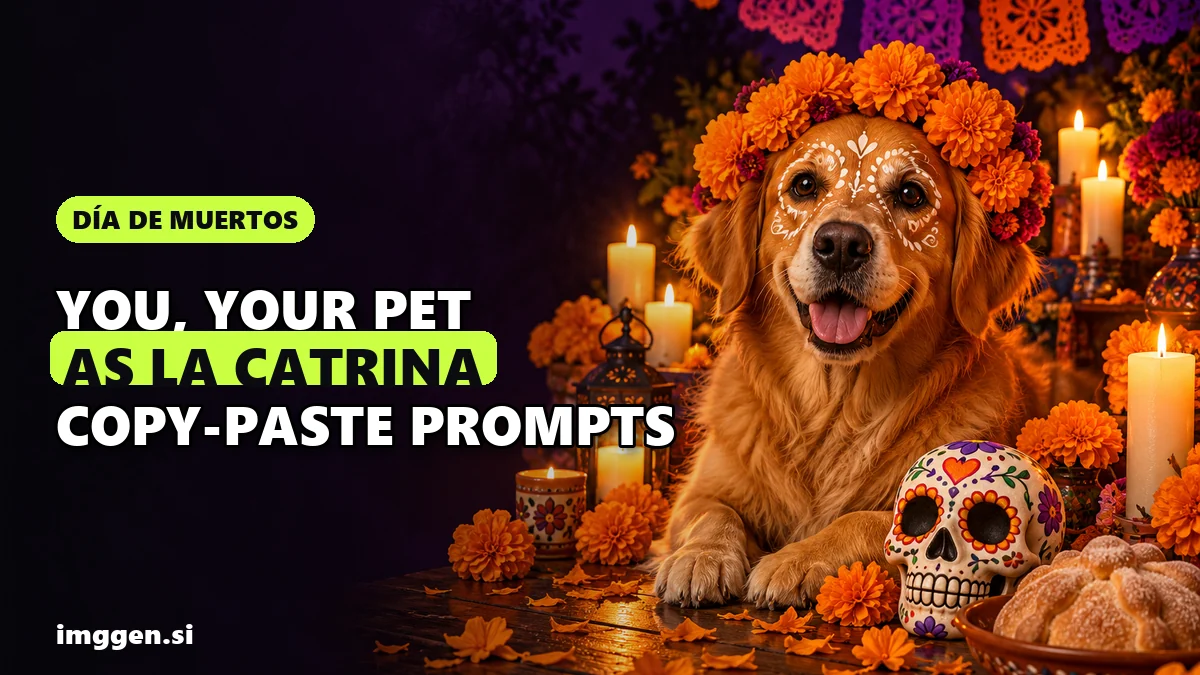
Keep the [dog/cat] from my photo exactly as it is: fur colour, markings, eye colour and ear shape. Add a small crown of orange marigolds and a tiny papel picado collar. Paint a few delicate white sugar-skull patterns around its eyes, light enough that its own markings still show. It sits calmly beside a small candlelit ofrenda with marigolds and pan de muerto. Warm, gentle, photorealistic close-up.Memorial ofrenda for someone you miss
Show the person in my photo as a framed photograph standing on a Day of the Dead ofrenda. Do not change their face, age or expression, and do not add face paint to them. Around the frame: orange marigolds, lit candles, pan de muerto, [their favourite food or drink], colourful papel picado above, a path of marigold petals on the floor. Calm, warm light, respectful, photorealistic.This is the version closest to the tradition itself, since the ofrenda is built around the person being remembered and the things they loved. Swap in a real detail, like their favourite sweet, their guitar or the cup they always used.
Product on an ofrenda table
Place the product from my photo on a small Day of the Dead ofrenda table. Keep the product's shape, colours, label text and logo exactly as in the photo; do not redraw the text. Around it: orange marigolds, lit candles, a hand-decorated sugar skull, papel picado banners above. Warm candlelight, shallow depth of field, photorealistic product photography, square 1:1.No-photo illustration
Folk-art illustration of a hand-decorated sugar skull surrounded by orange marigolds, candles and papel picado, inspired by early 1900s Mexican relief prints, bold black linework with marigold orange, magenta and turquoise accents, symmetrical composition, textured paper background, festive and warm, no gore.Want to build your own variations and save them? Use our free prompt studio.
How to make a Day of the Dead product photo or short video
For shops (candles, sweets, jewellery, prints, ceramics), you usually want the real product with a seasonal scene behind it, not a fully generated image. Photoroom is built for that: you describe the scene in a text prompt and it generates a background with the lighting and shadows already in place. There is a free version; batch editing and high-resolution exports are on paid plans. Try a prompt like "wooden ofrenda table with orange marigolds, candles and papel picado, warm evening light."
Timing matters here. The main days are 1 and 2 November, so a product shot made today is for last-minute posts or next year's catalogue. Save your best prompts now, and next October you can start in early October instead of at the last minute.
To turn a finished portrait into a clip with flickering candles and drifting petals, use an image-to-video tool. Higgsfield's image-to-video page lists more than 15 models, including Kling, Veo, Seedance and its own Soul model, lets you set the camera move and pacing in the prompt, and can upscale the result to 4K. Ask for small motion only (candle flames, petals, a slow push-in) because faces change most when the head moves.
Is an AI Day of the Dead portrait respectful? Privacy and commercial use
Respect the tradition
- Call it what it is. A Catrina portrait isn't a "Mexican Halloween costume." Captions that mention who you're remembering, or a line about what the day means, land better than "spooky season."
- Skip gore and horror. Blood, rotting skin and zombie looks belong to Halloween, not here.
- Don't sexualise La Catrina. She is a cultural figure with a history, not a pin-up template.
- Be careful with other people's dead. Only put someone on a memorial ofrenda if you are family, or the family has agreed.
Your face and other people's
Only upload photos you have the right to use, and ask before you paint a friend or partner. Google's Gemini privacy hub says to "only upload, generate, and edit content you have rights and permissions to," to get permission before using other people's faces, and that human reviewers look at some of the data it collects. So don't upload anything you wouldn't want a reviewer to see. Check the privacy settings of whichever app you use.
Kids' photos
Think twice before uploading a child's face to any AI app, and before posting the result publicly. For a family post, the pet prompt or the no-photo illustration gets the festive look without a child's likeness, and if you do use a child's photo, keep the result in a private family chat and ask the other parent first.
Commercial use
Check your plan's licence before you sell anything: ImagineArt's free plan, for example, is limited to personal use. Ownership is a second issue. In Part 2 of its AI report (January 29, 2025), the US Copyright Office concluded that prompts alone don't make you the author of an output, so purely AI-generated images aren't protected by copyright, although your own creative selection, arrangement and edits can be. Images made or edited in the Gemini app also carry a visible watermark and an invisible SynthID mark. Never sell Catrina portraits of real people without their permission.
Reality check. Expect a few tries for each good image. Common faults are paint that sits unevenly over one eye, petals that melt into the hair, a nose that quietly changed shape or a pet whose markings disappeared under the paint. The source photo fixes more of these than prompt tweaks do. Free credits go fast once you start regenerating. If you want to sell custom Day of the Dead portraits, the season is short and most beginners get few or no orders at first, so test interest with friends and followers before paying for a bigger plan.
What else can you make this season?
The same "keep the real face, change the scene" method works for the holidays coming up. Put your family or pet in a globe with our AI snow globe photo prompts, make a card with the AI Christmas family photo guide, or compare more image tools in our tool index.
FAQ
Is it disrespectful to make an AI Day of the Dead portrait?
Not if you treat it as remembrance rather than a costume. Use traditional elements like marigolds, candles and an ofrenda, skip gore and horror, and avoid sexualising La Catrina. A portrait that honours someone you miss is closest to the tradition.
What is the best Day of the Dead AI filter?
For one tap, filter apps such as YouCam Perfect have a Day of the Dead effect. For more control over the face paint, flowers and background, an AI image editor with a prompt gives better and more personal results.
What should a Day of the Dead AI prompt include?
Tell the AI to keep the face exactly as in your photo, then describe the face paint (white base, black eye circles, flowers, stitched lips), a marigold crown, and an ofrenda background with candles and papel picado, plus warm candlelight and an aspect ratio.
Is Day of the Dead the same as Halloween?
No. Día de Muertos is a Mexican celebration, recognised by UNESCO, that honours deceased loved ones from late October into early November. It is about remembrance and welcoming the dead home, not about being scary.
Can I sell Day of the Dead AI art?
Only if your tool's plan includes commercial rights, and only with permission from anyone whose face appears. In the US, purely AI-generated images aren't protected by copyright, so others may be able to copy them.
Sources
- UNESCO: Indigenous festivity dedicated to the dead (Mexico), Intangible Cultural Heritage
- El Universal: ¿Quién inventó la Catrina?
- YouCam Perfect: How to create a sugar skull for the Day of the Dead (Sep 19, 2026)
- Google: Image editing in Gemini just got a major upgrade (Aug 26, 2025)
- ImagineArt: AI Image Editor
- Photoroom: AI Backgrounds Generator
- Higgsfield: Image to Video AI
- Google: Gemini Apps Privacy Hub
- US Copyright Office: Copyright and Artificial Intelligence (Part 2, Jan 29, 2025)
- Jones Day: Copyrightability of AI outputs, US Copyright Office analyzes human authorship requirement